
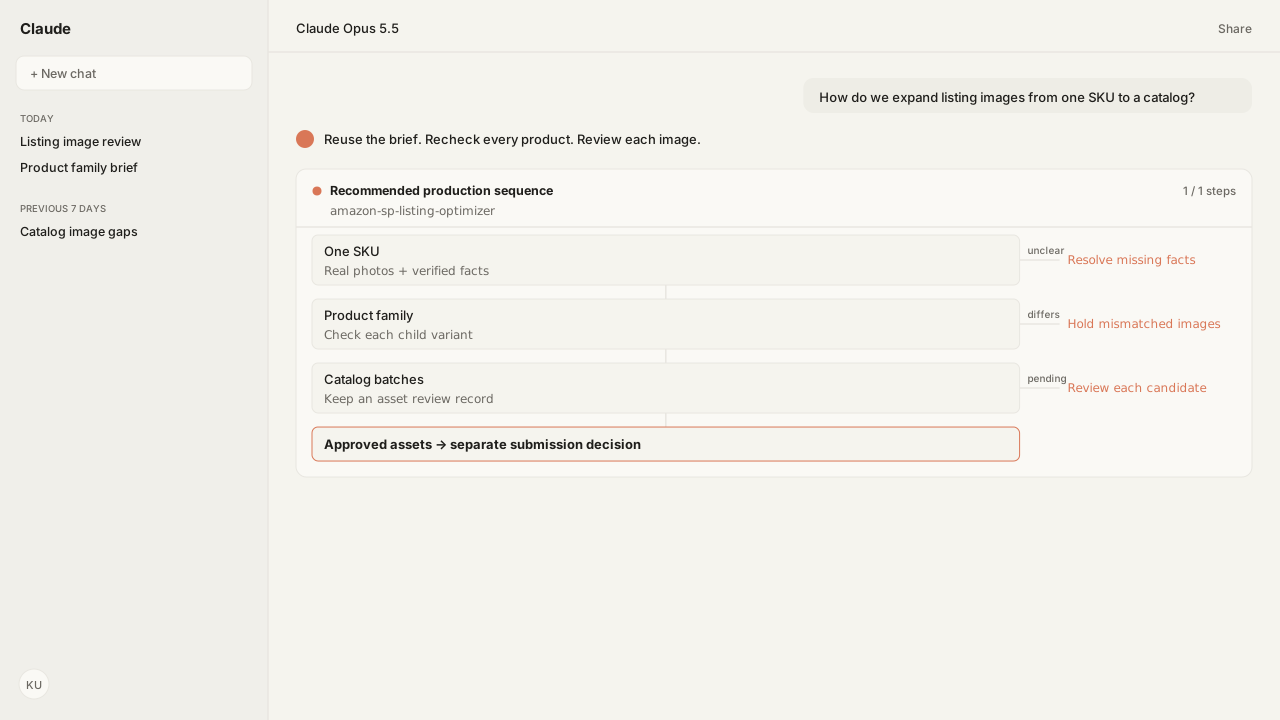
- Start with one SKU’s real photos and verified facts. Carry the reviewed creative direction to a product family, then organize catalog batches around separate asset records.
- Recheck each child’s color, size, quantity and included items. A sibling’s approved image is reusable only when it still represents the receiving product accurately.
- File validation and human review are different gates. The Skill requires approval for every generated image; a batch-generation request does not authorize bulk publishing.
- Test a small scope before designing production submission. VALIDATION_PREVIEW is not a production catalog loop, and ACCEPTED does not mean the image is live.
Here is how to create Amazon listing images from real product photos and verified listing facts, then expand the workflow from one SKU (stock keeping unit) to a product family and catalog batches. Keep each variant’s appearance and included items accurate. Generate and review candidates in batches; approve each image and choose the submission workflow separately before anything changes on Amazon.
A family can share the same scene without sharing the same product facts. Your smallest size, newest color and multipack may need different measurements, references and labels. The Listing Optimizer Skill reads those listing differences through the Selling Partner MCP. Amazon Agent Iris creates the requested image from the references you select, so reuse starts with the creative direction, not an assumption that one sibling’s image fits every child.
Plan the gallery around what a buyer needs to see. This is a production worksheet, not the result of a customer run.
| Image role | What the image should establish | Input to verify |
|---|---|---|
| Main image | The exact product and quantity offered | Current variant, included items and main-image rules |
| Lifestyle or in-use | How the product fits a real setting | Actual scale, use and accessories supplied |
| Detail | A material, control or construction feature | A clear reference showing that feature |
| Size or feature graphic | A fact the buyer cannot infer from a photo | Verified measurements and supported claims |
Real photos and listing facts define the first SKU’s brief
The first SKU establishes a brief your team can inspect before expanding production. Confirm the seller, marketplace and Amazon Standard Identification Number (ASIN). The Selling Partner MCP reads the current listing attributes and catalog images; the Listing Optimizer Skill uses the existing photos as generation references. Supply additional owned photos when a missing angle or obscured feature cannot be established from the listing.
Treat the listing as evidence to verify, not permission to repeat a contradiction. If the photo shows one lid and the attributes describe another, resolve the difference before generation. A size graphic needs confirmed dimensions; a missing measurement stays missing. Product identity, packaging, quantity and included accessories belong in the brief alongside the desired scene.
For each requested slot, record:
- The product references to preserve and the facts they establish.
- The image’s job: main shot, lifestyle, detail or explanatory graphic.
- What may change, such as lighting or background, and what must remain accurate.
- The marketplace and product-type rules, plus the person who will review the result.
Use Iris as the Amazon listing image generator for the creation and editing steps. The Iris documentation explains model access, uploads and returned asset URLs. The standalone Listing Optimizer image workflow is another path: it calls your configured image provider and stages approved files in your storage. It does not host images itself. Pick the configured path before promising a generation run.
A product family can share a layout without sharing every image
A product family is the next useful scope because shared creative direction and variant-specific facts meet in the same review. Read each child listing through the Selling Partner MCP. A variation parent organizes the family; it does not establish the size, color or pack count of every child.
Reuse an approved composition, lighting brief or genuinely variant-neutral explanation where it remains true. Recheck product depictions against each child’s references. Recoloring an image is not evidence that the resulting product exists, and a graphic approved for a single unit may misrepresent a multipack.
| Family element | What can carry forward | What must be checked per child |
|---|---|---|
| Creative direction | Scene, framing and visual hierarchy | Product shape, color and proportions |
| Dimension layout | Graphic structure | Measurements and units |
| Included-items explanation | The type of explanation | Pack quantity, accessories and packaging |
| Neutral care information | Verified family-wide instructions | Material or care exceptions |
The Iris family workflow can identify potentially reusable sibling images. Your review still decides whether each candidate accurately represents the receiving SKU. Hold a child with missing or conflicting facts instead of carrying an uncertain image across the family.
Catalog batches need an asset record and a review owner
Bulk product image generation is useful when it repeats a reviewed brief while preserving a separate record for every SKU and image. Start with the one-SKU result, test the family differences, then group catalog work by marketplace, product type and image need. This is a recommended rollout sequence, not a claim that the Skill automatically clones an approved gallery across your catalog.
Ask the Listing Optimizer Skill to scan the scope you name for image gaps. A whole-catalog scan requires that scope explicitly; generation need not start for every listing the scan finds. Prioritize unresolved main-image issues and the gallery gaps your team chooses to address. Where commercial context matters, Amazon Ads MCP supplies advertising evidence rather than a guessed return from better imagery.
Keep a batch review sheet with these fields:
| Record | Why it stays with the asset |
|---|---|
| Seller, marketplace, SKU, ASIN and family | Prevents a valid image being assigned to the wrong listing |
| Source references and verified facts | Shows what the generator was allowed to depict |
| Target image slot and brief version | Distinguishes main-image rules from auxiliary-image work |
| Candidate URL and validation findings | Makes the exact file and its unresolved checks reviewable |
| Human decision and reviewer | Separates approved, rejected and held candidates |
| Submission ID, status and later verification | Distinguishes a generated asset from an ingested contribution |
Your team can retain the review sheet beside catalog history in the Amazon Agent Data layer. Agree the batch size, provider spend and review owner before generation. Expand after the first batch exposes its reference gaps and review effort; there is no universal throughput or cost promise here.
The same product references can support a separate Omni video brief
Approved product references can also seed Google Gemini Omni shots through Iris. Fresh clips are 3–10 seconds; an owned Iris video can be extended up to 40 seconds total. Review product fidelity and actual returned duration. A finished 60-second deliverable needs external assembly: Iris has no native stitching or final-export tool. Listing-image approval does not authorize billed video creation or publication; use a separate placement-specific brief and the video controls.
Every candidate needs file checks and human product review
Amazon AI product images need the same truthful product representation and applicable image rules as other listing images. Amazon Agent Atlas supplies the Product image guide, Image suppression guidance and Product page style guides. The last source matters because category rules can change what belongs in the main image.
| Check | Amazon guidance or workflow rule | Review consequence |
|---|---|---|
| Main background and framing | Generally pure white, RGB 255, 255, 255; product at 85% of the frame | Check the applicable category rule before approving a different treatment |
| Image dimensions | Amazon requires 500–10,000 pixels on the longest side; 1,000 pixels or more enables zoom | The Skill’s 1,000-pixel minimum is a stricter workflow safeguard |
| Product accuracy | Show the actual product, quantity and included items | Compare the generated candidate with this SKU’s references |
| Main-image additions | No added text, badges, borders or watermarks | Keep explanatory graphics in appropriate auxiliary slots |
| AI-generated photorealistic people | Amazon requires contains-synthetic-performer in Extensible Metadata Platform (XMP) dc:subject | Confirm the required metadata before upload |
The Listing Optimizer validator measures format, color space, size, the main image’s white border and estimated product fill. Its PASS means those checks cleared. It does not certify product fidelity or guarantee Amazon will display the image. Text, labels, logos, focus, proportions and included parts remain human review items; FAIL candidates return for correction and unresolved REVIEW items stay on hold.
Amazon recommends six additional images and one video, but that is not a reason to generate filler. Cover the buyer’s unanswered questions with accurate assets. Noncompliant images can cause suppression, so replacing a failed main image takes priority over adding another lifestyle scene. The image requirements and suppression guidance establish those boundaries.
What happens next: approve assets, then choose the submission path
Approve each image before it becomes a listing change. Confirm its SKU, marketplace and slot, then ensure the approved file remains fetchable during Amazon’s ingestion. Iris returns hosted asset URLs; the direct Skill path stages files in your configured storage. Neither a generated file nor an image-review decision is a submission receipt.
For a small test, the Listing Optimizer Skill previews the proposed patch, asks for separate confirmation and submits the same change. Amazon’s VALIDATION_PREVIEW is intended for testing a small number of listings and has lower rate limits; it is not designed as a production catalog loop. Production bulk submission needs a separately reviewed integration. Amazon offers multi-SKU media submission through JSON_LISTINGS_FEED, but that API capability does not establish that this Skill implements a bulk feed publisher.
- Rejected or held image: correct the candidate or resolve its missing product fact; do not submit it.
- Approved small-scope change: review the exact patch and confirm submission through the Selling Partner MCP.
- Catalog production rollout: agree the submission method, retry handling and per-SKU results before sending the batch.
ACCEPTEDsubmission: retain the submission ID and check later status and issues. Acceptance is not proof that the image is live or selected for display.
Keep the same product evidence attached as work expands. The reusable asset is the brief and review process; the approval remains specific to the product and image.
If an image change begins with a listing problem, start with the listing audit-to-patch workflow.
Bring your product references into a repeatable image workflow
Start with one listing and the photos you already own. In a working session, map the catalog reads, Iris generation, product checks and approval steps your team needs before expanding to more SKUs.
Request beta accessWhat you need to run listing image production
- MCP
- Amazon Selling Partner MCP for listing and catalog reads and approved image-attribute changes; Amazon Agent Iris for image generation, editing and review tools.
- Skill
- Listing Optimizer, amazon-sp-listing-optimizer 1.2.1, Reference status. Direct provider generation and staging differ from the Iris-hosted asset path.
- Atlas collection
- amazon_sellers: Product image guide; Image suppression; Product page style guides; Manage listings issues.
- Required subscriptions
- Authorized seller/marketplace access and the chosen image-provider key. Direct Skill generation also needs a Python-capable host and configured storage; Iris uses its configured hosting.
- Last verified
- 2026-10-16
- scope
- Recommended one-SKU, family and batch rollout. No live customer generation or production bulk submission was executed for this revision.
What success and failure look like for listing image production
| condition | interpretation |
|---|---|
| Validator PASS but wrong variant or pack quantity | Reject the candidate. File checks do not establish product fidelity. |
| Candidate reference or measurement is missing | Hold that SKU and resolve the fact before generation or approval. |
| Every batch image is approved, submission method not agreed | Assets are ready for a submission review; approval does not implement bulk publishing. |
| Submission returns ACCEPTED | Keep the submission ID, then check later status and issues; display is not guaranteed. |
FAQ
Can I reuse one image across all variants?
Only if it accurately represents every receiving variant. A neutral care graphic may transfer; a color-specific product shot, size graphic or included-items image may not. Read each child’s facts and review the exact file before reuse.
Does bulk image generation mean automatic catalog publishing?
No. Batch generation creates candidates for review. The Listing Optimizer requires approval for each image, and production bulk submission needs a separately reviewed method. Amazon’s bulk media API capability does not mean the Skill implements an unattended feed publisher.
Can I use the same product references for video?
Yes, with a separate video brief and approval. Iris uses Google Gemini Omni for short clips and extensions; product fidelity and the destination need separate review. Image approval does not approve billed video generation, final assembly or Seller Central upload.